


10 Best Free AI Tools for Students in 2026 That Actually Work
Every semester, millions of students get pitched the same thing: pay $20/month for ChatGPT Plus, or fall behind. YouTube creators say it. Subreddits say it. Even your classmates say it.
Here's what they don't tell you: most of the genuinely useful AI study tools are completely free. I've spent the last few months testing tools across writing, research, math, and exam prep — and the free tiers have gotten surprisingly good in 2026. Like, embarrassingly good for something that costs zero dollars.
This isn't another generic roundup. I'm going to tell you exactly what each tool does, where it falls short, and whether you actually need to pay. Let's go.
What Makes an AI Tool Actually Useful for Students?
Before the list, quick framing.
Not all AI tools are equal. Some are great for drafting essays. Others are built for research. Some handle math well; most don't. The mistake most students make is picking one tool and expecting it to do everything — and then getting annoyed when it hallucinates a citation or botches a calculus problem.
The best setup in 2026 is a rotation — different tools for different tasks. That's what this list is built around.
A good student AI tool needs to do three things: compress information, explain hard concepts, and help you produce work faster. If it doesn't do at least one of those reliably, it doesn't belong on your desk.
1. NotebookLM — Best for Studying From Your Own Notes
NotebookLM is the most underrated student tool available right now. You upload your lecture slides, PDFs, textbook chapters — and it becomes an AI tutor that only knows your material.
Ask it "What are the key themes in Chapter 4?" or "Quiz me on the mitochondria section" — and it answers using only what you uploaded. No hallucinations from outside sources. No random facts it made up from the internet. Just your material, organized.
The free tier is genuinely generous: up to 100 notebooks, 50 sources per notebook, 500,000 words per notebook. For a full semester of coursework, that's more than enough.
That's the shift. Most AI tools give you a general brain. NotebookLM gives you a study partner that's read everything your professor assigned.
2. ChatGPT Free — Best for Explanations and Essay Drafts
Yes, ChatGPT still deserves a spot — but the free tier specifically.
In 2026, the free version gives you unlimited access to GPT-4.1 Mini (which is genuinely capable for most student tasks), limited access to GPT-4.1 full model, and basic web browsing. You can use it without even creating an account at chatgpt.com.
Where it shines: explaining hard concepts in plain language. Ask it to "explain quantum entanglement like I'm 17" and it does that better than any textbook I've read. Great for outlining essays, debugging code, and translating between languages.
Where it falls apart: math that requires precise computation, academic citations (it will hallucinate sources), and very recent information unless web search is working.
Use it as a thinking partner, not a ghostwriter. The difference matters — especially if your university has an academic integrity policy that covers AI use.
3. Google Gemini Free — Best for Google Docs Users
If you do most of your work inside Google Docs, Gemini is the obvious choice. The free tier includes full access to Gemini 3 Flash, limited Deep Research, and direct integration into Docs, Sheets, and Gmail.
The student deal is worth checking: students with a .edu email can access Gemini 3.1 Pro, NotebookLM Plus, and 2TB of storage through Google's SheerID partnership — free for 12 months. Eligibility depends on your region, but if you qualify, it's by far the most feature-rich free AI package available anywhere.
Even without the student deal, the free Gemini tier handles multimodal tasks well. Upload an image of a handwritten equation. Paste a research paper. Ask it to summarize your notes. It handles context better than most free tools.
4. Perplexity AI — Best for Research With Real Citations
Here's the thing about research: you need sources you can actually cite. ChatGPT makes them up. Claude admits it can't verify them. Perplexity gives you real, clickable citations from the web — which is a completely different category.
The free tier offers unlimited standard searches and 5 Pro searches per day. For most research workflows, that's enough. Switch to Academic Mode and Perplexity pulls from peer-reviewed sources specifically.
Start every research-heavy assignment here. Pull 5–10 sources you can actually defend in your bibliography. Then move to NotebookLM to analyze them, and Claude to write up your draft. That rotation covers everything from a 3-page essay to a full thesis chapter.
5. Claude Free — Best for Long Documents and Nuanced Writing
Claude handles large chunks of text better than most free AI tools. Its free tier runs on Claude Sonnet — which is capable for writing help, document analysis, and anything that needs careful reasoning over a long passage.
Where Claude stands out for students: paste in a 20-page research paper and ask "what are the three weakest arguments here?" It reads it. Properly. Not a summary — it actually engages with the content.
It's also better than ChatGPT for writing that needs to sound human. If you're polishing a personal statement, a cover letter, or an essay that needs actual voice — Claude is the right tool. The output is less generic, less templated.
The free tier has daily message limits. Use it for the tasks that actually need it: big documents and serious writing. Don't burn your free messages asking it what year Columbus sailed.
6. Grammarly Free — Best for Polishing Any Written Work
Grammarly isn't glamorous. It doesn't write for you, it doesn't explain things, and it won't help with your calc assignment. But it catches mistakes that matter — comma splices, passive voice overload, weak word choices — faster than any human editor.
The free tier covers grammar, spelling, punctuation, and basic tone detection. That's genuinely useful for any assignment you're submitting.
The paid tier adds full sentence rewrites and plagiarism checking. For most students, the free tier is sufficient. Run it on anything you're submitting before it leaves your hands.
7. Wolfram Alpha — Best for Math and Science
Let's be direct: do not use ChatGPT or Claude for math. They compute poorly, they hallucinate steps, and they'll confidently give you the wrong answer.
Wolfram Alpha exists for exactly this. It handles calculus, statistics, chemistry equations, physics formulas, and complex algebra step-by-step — and it shows its work. The free tier covers most coursework-level problems.
Think of it as a calculator that explains its reasoning. For STEM students especially, this is not optional. Use it to verify every numerical answer you get from any other AI tool.
8. Quillbot — Best for Paraphrasing and Summarizing
Reading a dense academic paper at 11pm before a deadline is a specific kind of misery. Quillbot helps.
The free tier includes a paraphraser, a summarizer (limited), a grammar checker, and a citation generator. The paraphraser is particularly useful when you're trying to understand a complex paragraph — paste it in, rephrase it in simpler language, and suddenly it clicks.
The summarizer on the free tier is capped to shorter texts, but for individual journal articles it works fine. Use the citation generator when you have a URL or DOI and need a quick APA or MLA format — it's faster than doing it manually.
One caveat: don't use Quillbot to spin AI-generated text and submit it as your own. That's academic dishonesty dressed up as a workflow hack. Use it for comprehension, not circumvention.
9. Notion AI (Free) — Best for Organizing Notes and Projects
Notion's free tier now includes limited Notion AI access — enough to summarize notes, generate action items from meeting notes, and ask questions across your workspace.
For students managing multiple projects, group work, or research sprints, Notion is where everything lives. The AI assistant makes it genuinely useful: highlight a block of notes and ask it to pull out the key points or turn it into a study guide.
It's not the most powerful AI model. But it's embedded where you're already working — and that frictionless integration is underrated. The best tool is often the one you'll actually open.
10. Gamma AI — Best for Presentations
Nobody teaches you how to make a good presentation. Gamma partially fixes that.
Describe your topic, pick a style, and it generates a full slide deck — structure, layout, visuals, and all. The free tier gives you a set number of AI credits per month, which is enough to create several presentations.
It won't replace a well-designed Canva presentation for something high-stakes. But for a quick in-class presentation, a seminar slide, or a project overview? Gamma turns a 2-hour task into 15 minutes. That trade-off is worth it.
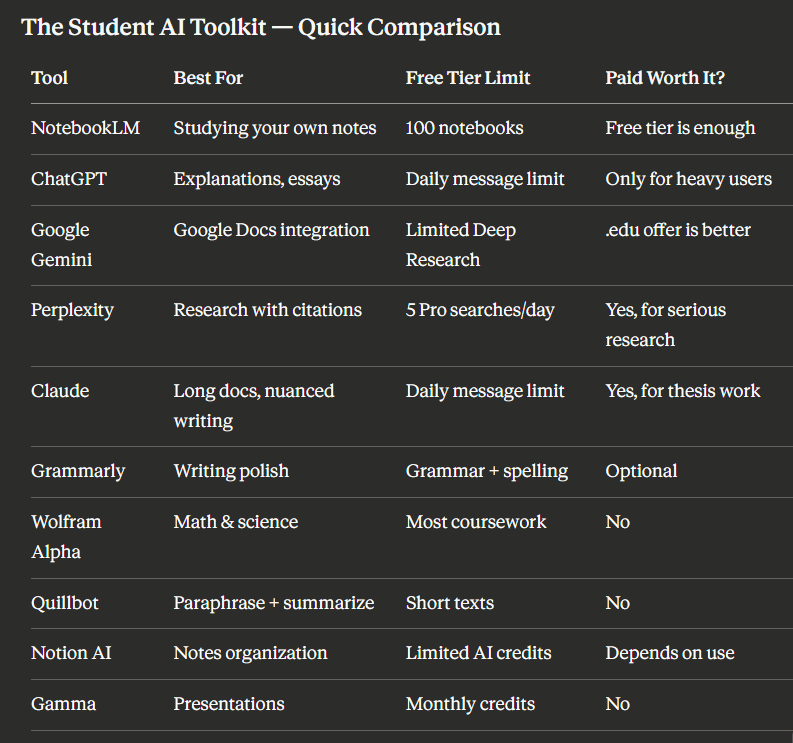
The Right Rotation for Different Tasks
You don't need all of these open at once. Here's how to use them based on what you're actually doing:
For a research essay: Start with Perplexity (find sources) → NotebookLM (analyze your materials) → Claude (write the draft) → Grammarly (polish).
For exam prep: NotebookLM (upload your notes) → ChatGPT (explain what you don't understand) → Wolfram Alpha (verify any numbers).
For a presentation: Gamma (build the slide deck) → ChatGPT (write the speaker notes) → Grammarly (check the text).
For coding assignments: ChatGPT or Claude (write and debug) → Wolfram Alpha (verify any math logic) → NotebookLM (if it's based on course material).
That's it. No $20/month subscriptions required.
A Note for Indian Students
Most of these tools work without a VPN in India and support English input without issues. Gemini's student deal has limited regional availability — check if your institution's .edu equivalent qualifies. Perplexity and NotebookLM both work well on Indian network speeds, even on mobile data.
If you're preparing for JEE, NEET, UPSC, or competitive MBA entrances, Wolfram Alpha + NotebookLM is the most useful combination. For language-heavy exams like UPSC Mains, Claude handles long-form comprehension and essay structuring better than any other free option.
You can also check out inclaw.me's free AI tools — including the AI Text Summarizer for compressing long study material and the AI Email Writer for applications and formal communications.
Do You Actually Need a Paid Plan?
Here's the real answer: probably not yet.
The students pulling ahead in 2026 aren't necessarily the ones paying more. They're the ones who learned to prompt well and rotate between tools. A paid plan gives you a slightly more capable model — but the ceiling of what's achievable on free tiers has risen significantly.
If you're doing research that needs 50+ web queries daily, Perplexity Pro is worth it. If you're writing a dissertation and need extended Claude context, Claude Pro makes sense. But for coursework, assignments, and exam prep? The free versions are genuinely sufficient.
Save the subscription money. Spend it on something that actually matters — like that textbook you've been borrowing from the library every week.
FAQ
Are free AI tools safe to use for academic work?
The tools listed here — NotebookLM, Claude, ChatGPT, Grammarly, Perplexity — are safe to use for studying and research. The important caveat is academic integrity: using AI to understand material and structure your thinking is generally acceptable; submitting AI-generated text as your own original work may violate your institution's policies. Check your university's guidelines before submission.
Which free AI tool is best for college essays and personal statements?
Claude (free tier) is the strongest option for personal statement writing. It produces less generic output than ChatGPT and handles longer, nuanced text better. Use it to get feedback and suggestions on drafts you've written yourself, rather than generating the essay from scratch.
Can AI tools help with STEM subjects like physics and chemistry?
Yes, but with an important caveat. Wolfram Alpha is the only free tool that handles math reliably — use it for computations and step-by-step problem solving. ChatGPT and Claude can explain concepts well but should not be trusted for precise numerical answers. Always verify calculations independently.
Is NotebookLM actually free, or does it need a Google account?
NotebookLM is free with a Google account. No credit card required. The free tier is generous — 100 notebooks, 50 sources per notebook — and the student plan (for .edu email holders in eligible regions) adds even more through Gemini for Students.
Will using AI tools get me flagged for plagiarism?
AI detectors are increasingly unreliable, but that's not the right question. The right question is whether your institution considers AI-assisted work academically honest. Use these tools to learn and improve your own work. If you're submitting text you didn't write — regardless of what any detector says — that's the actual risk.
What's the best free AI tool for coding assignments?
ChatGPT (GPT-4.1 Mini, free) handles most coding languages well — Python, JavaScript, C++, SQL. Claude is stronger for explaining why code works or doesn't. For complex algorithmic logic, Claude's reasoning tends to be more precise. Both are free and both are solid starting points for debugging or understanding unfamiliar syntax.
Do these tools work in India without a VPN?
Yes. All 10 tools on this list are accessible in India without a VPN. Perplexity, NotebookLM, and Claude work on mobile data as well. Gamma can be slightly slower on weaker connections when rendering visual templates, but it still functions.
Wrapping Up

The AI landscape for students in 2026 is better than it's ever been — and most of it is free. NotebookLM changed how exam prep works. Perplexity made research citations actually trustworthy. Claude made long-document work manageable without a premium subscription.
You don't need to pay $240 a year to study smarter. You need to know which tool to reach for and when. That's the actual advantage.
Start with NotebookLM and Perplexity. Add Claude when you're writing something serious. Use Wolfram Alpha every time numbers are involved. Build the rotation over the first few weeks of term — and you'll be in a better position than most students who are paying for tools they barely use.
And if you want even more free AI tools in one place, check out inclaw.me — over 50 free AI tools, no paywall, no account needed for most of them.